Why I returned my 2018 MacBook Pro
I’ve been in the market for a new laptop since 2012 as my mbp is on it’s last legs (batter life is shit and I’m only rocking TB1 ports on it….quite archaic) and I haven’t been impressed with any of the updates thus far….so I’ve been holding off. But recently my laptop’s battery just won’t charge fully, and dies in about 10 minutes off a charger, not ideal for a mobile workstation.
And so I began the process of researching what the new laptops would bring to the table.
I had a few requirements. Affordable, good battery life, sleek looking, able to transcode footage at a decent rate, and be able to play games decently (I travel a lot).
I was a little put off by all of the i9 issues when the laptops first came out (I mean seriously, how do you not QC these things before going to market?) but after the fix that apple provided I felt like it was time to pick up the laptop and put it to the test.
I’ve been looking to retire my 2013 mac pro trashcan for some time now. I picked it up 5 years ago to spit out dailies for a movie call The Adderall Diaries which was shot on red. It worked great for not needing a RRX and because Helium footage really doesn’t take advantage of the RRX and is more about the CPU/GPU I figured using some 8KWS footage would be a good stress test….as if I was going to replace this trashcan with this laptop it should have some kick to it, especially since the trashcan is 5 year old (if not more) technology.
I was very surprised at the results.
TL;DR: The 2013 Mac Pro beats the 2018 MacBook Pro by almost double the render time.
Also if you’re looking for a more comprehensive test other than what I’m doing here, Antony Guerrero did some insanely detailed tests against other macs. You can find those tests here.
Here’s the cost breakdown (it says refund because that’s what I have on my account at the moment):

I had a 2 minute 39 second 8KWS .r3d file from a music video that I shot to use as my work file for this test, as well as a 2 minute arriraw file (not as curious about this as red files are more power hungry and thus more of what I’m interested in for true dailies work off a laptop. This laptop does a very good job with ProRes files, around 80fps, but I knew that and wasn’t quite interested in testing that).
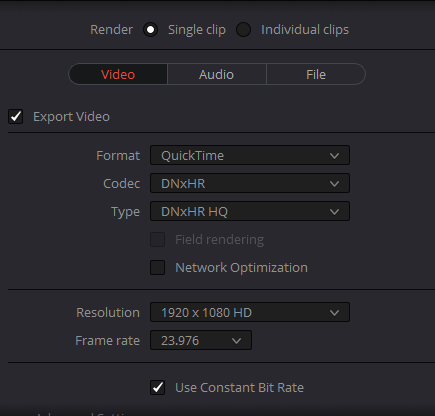
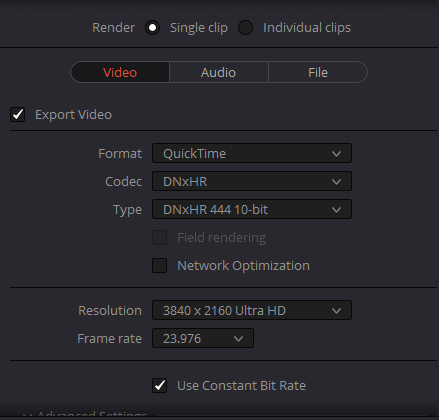
I wanted to encode to two different file types: 1920×1080 @ 422 (what I deliver on most commercials) and 3840×2160 @ 4444, for finishing purposes, with the debayer set to full res.
Here are the settings to confirm.
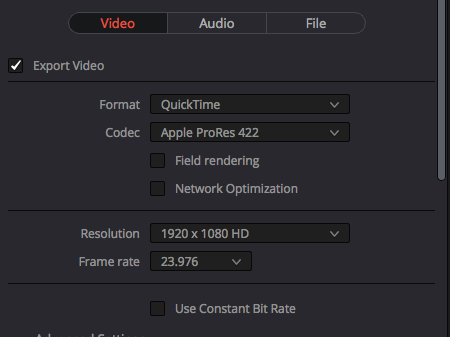
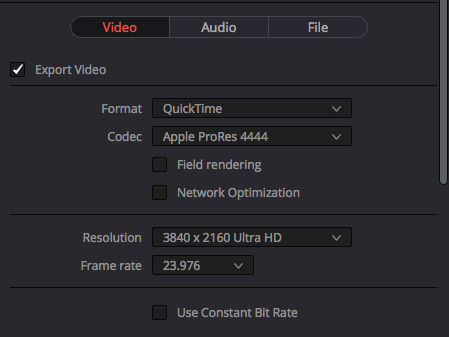
I rendered on both the 2018 mbp & 2013 mp fro the desktop & to the desktop, taking advantage of both of the screaming fast internal SSDs.
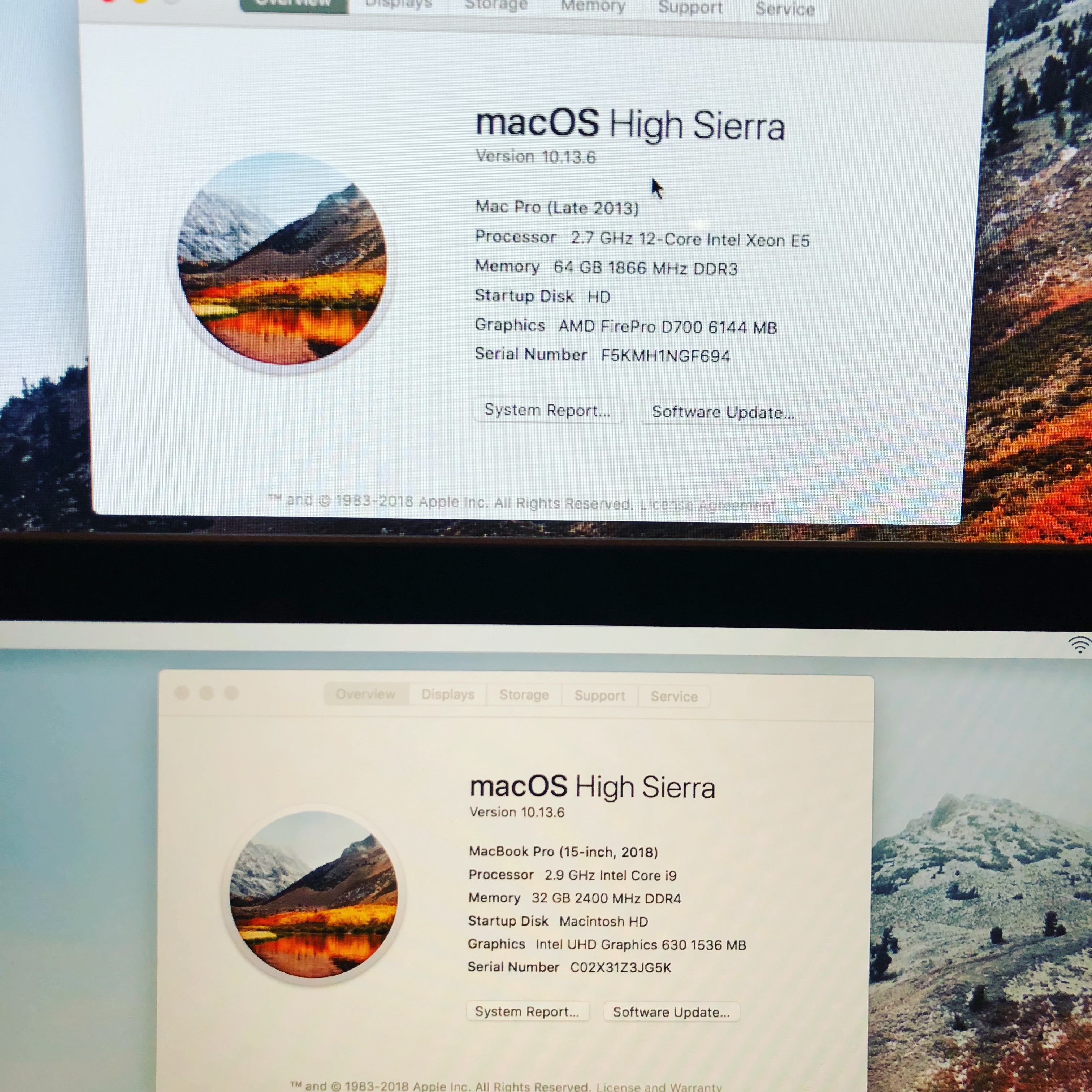
Here are the specs for both (sorry for the potato quality, it’s all I have)
Interestingly enough it only shows the non-discrete gpu and not the internal raedon 560 on the laptop.
To keep it consistent to the photo above, the 2013 Mac Pro will be first and then the 2018 MacBook Pro
Here’s the result.
2013 Mac Pro
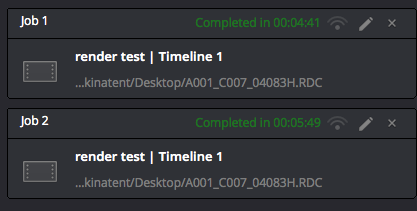
2018 MacBook Pro
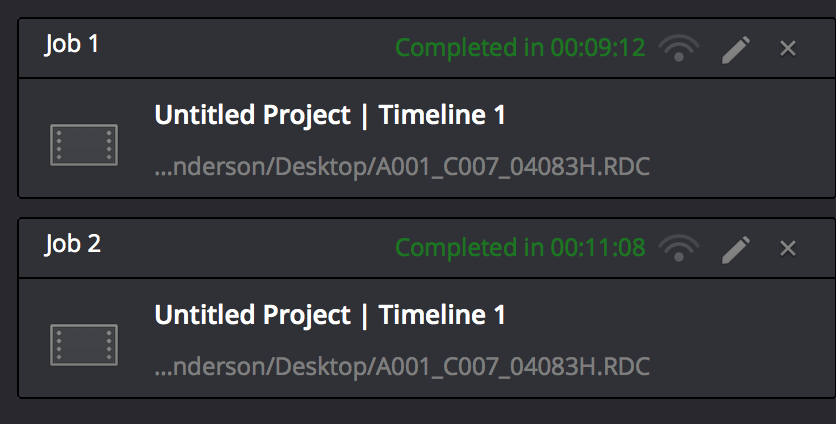
2018 MacBook Pro w/ Blackmagic eGPU (Radeon Pro 580)
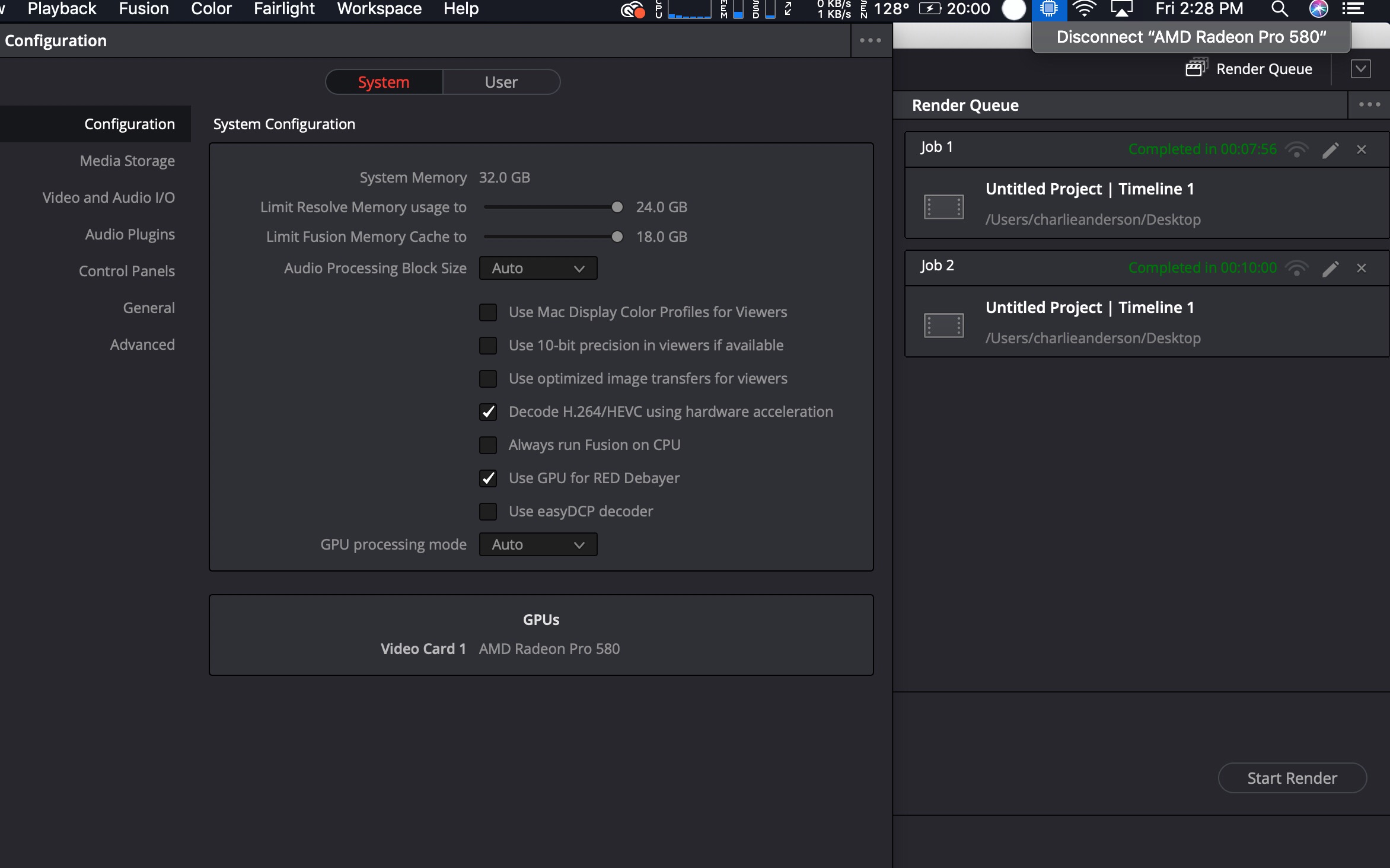
I found it intriguing that the eGPU only reduces render times by a minute. I’m sure if you had additional eGPUs added to the system it could really crank through some footage.
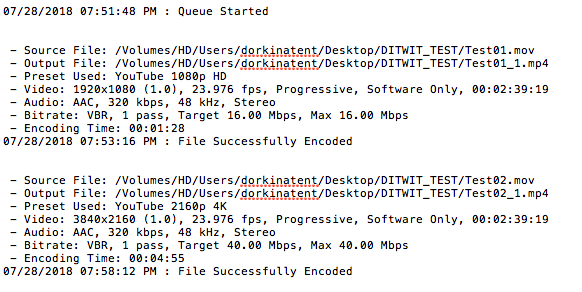
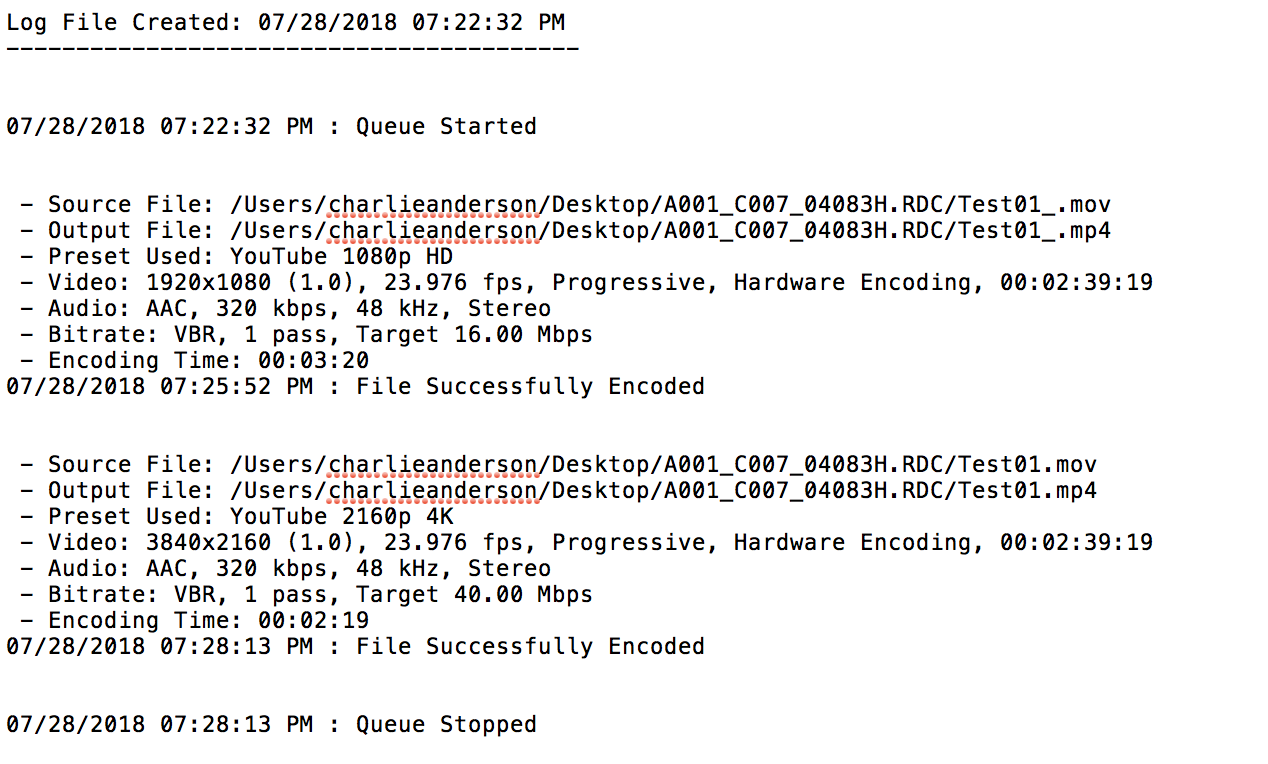
Next up was H624 encoding, which I tend to do a lot of. I learned that the intel chip of the i9 has H264 hardware acceleration built in to it’s processors which is fast af, you’ll see below. Here’s the result of encoding the two files (422 & 4444) to H624:
2013 Mac Pro
2018 MacBook Pro
Ultimately I came to the conclusion that spending $4500 on a laptop (+$700 for the eGPU, and another $400 for TB3 peripherals/usb-c hubs, AND I don’t like the absence of the legacy ports, I need a damn USB port ) , while it is a nice laptop, isn’t worth it for what I need. I even tried playing Guild Wars 2 on the mbp and at max settings I was getting ~12fps. I gave Fortnite a try and literally couldn’t load a game for 30 minutes, and when I was able to load in it couldn’t sustain a measly 30 fps on LOW settings.
It’s much better for me to keep my Mac Pro and use that for renders, even though it’s 5 years old at this point (I hear the iMac Pro shreds with renders as well. If I get my hand on one I will update this post with what I found out for that). Although I eagerly await the 2019 Mac Pro…RIP my wallet when that drops.
But that left me with my original problem: I needed a laptop.
I had bought a 14″ Razer laptop for a travel job last year (had a 2 week VR job that I needed power & portability. Ultimately I could have brought my trashcan with me as I had a desk the whole time), and I was a fan of it minus the thick bezels (reminds me of the macbook air).
But they just came out with a 15.6″ version. And it’s $2600. And it fits a lot of what I wanted, especially in the gaming aspect, plus having a 1070 in it interested me (I have a 1080ti in my gaming PC at home), and I edit primarily in Premiere so it’s cross platform with mac/pc.
I decide to buy it and give it a shot. If anything it would be my everyday laptop with the ability to edit on it and also do transcodes as needed (granted I don’t have prores with the windows version of resolve, but there’s always scratch if I was in a pinch.)
I also wanted to give this laptop the same test from the mbp & mac pro. So here is the result of that, with encoding to DNxHR instead of ProRes:
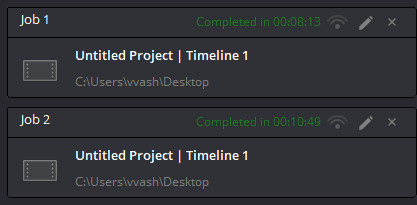
Pretty much the same render times as the $4500 mbp, minus ProRes (there’s a hack to be able to render to prores, but it’s a pain in the ass. Alternatively there’s Scratch that will render to ProRes in a pinch). This thing has a TB3 port in it also, so would be interesting to see if I put a 1080ti in a eGPU enclosure what the render times would be (probably a minute less).
Either way, I’m happy with my decision to sport the Razer 15.6″ instead of my mac. Now if only iMessage could run on windows I could finally make the switch.
Let me know what you think in the comments below.